A home for your projects
Import from the system folder picker. Group services into folders, then start, stop, or restart them in place.
 Spring Boot Launcher
LOCAL DEVELOPMENT, LESS FRICTION
Start Spring Boot services, follow logs, and stay in your flow. From Codex, Claude Code, or your browser.
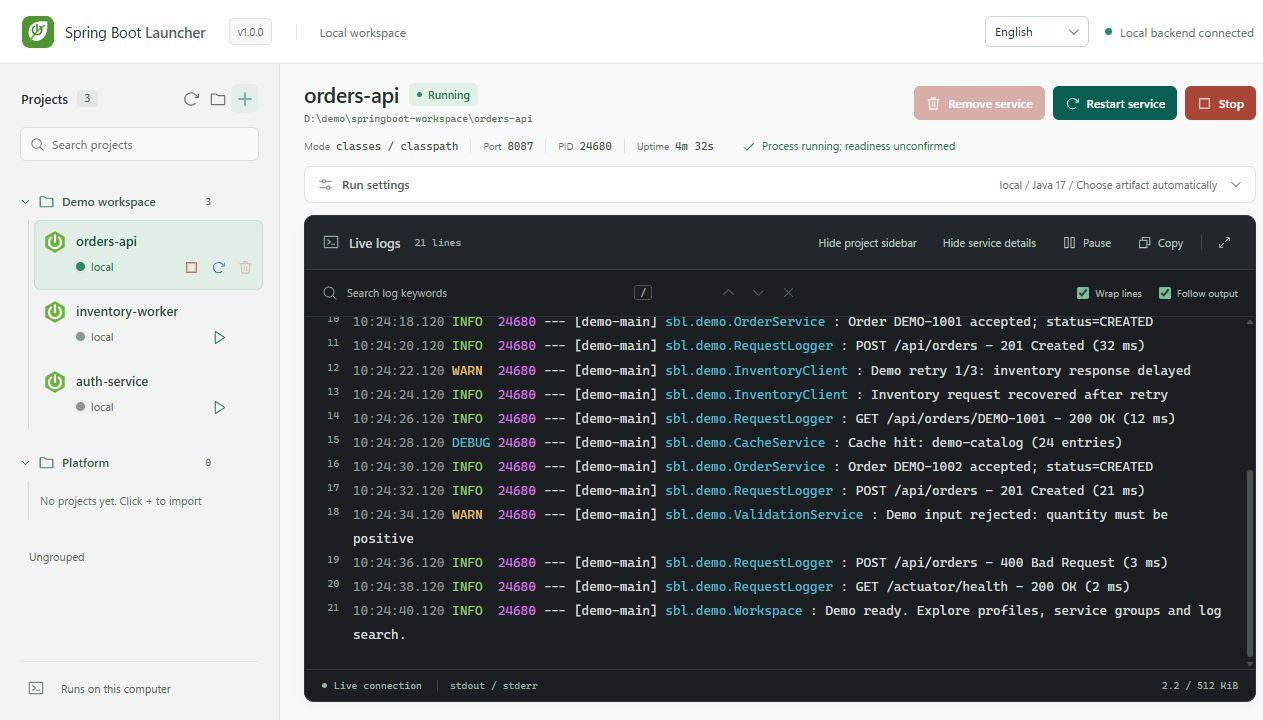
1.0 interface, captured on 1.0.0, isolated demo projects and simulated logs. Preview only; your services run in the local application.
The daily work of running services, brought into one local workspace.
Explore the documentation ↗Import from the system folder picker. Group services into folders, then start, stop, or restart them in place.
Keep ANSI colors and surrounding context. Jump between search matches, pause scrolling, or give logs the whole panel.
Discover local JDKs and project profiles. Reuse available artifacts or let startup prepare Maven compilation and dependencies.
A local service manager with eight MCP tools, a CLI, and a web dashboard. Use them together.
Spring Boot LauncherShared local backendorders-serviceinventory-serviceYour Spring Boot projectsServices are shared when clients use the same Windows user and backend directory. No account or cloud service required.
Install once, open the dashboard, then connect your preferred AI client.
Download and open the Windows installer. Choose a folder, create desktop shortcuts, and optionally connect Codex or Claude Code.
Download installerRequires an internet connection. The guide can install a portable Node.js runtime if needed.Run in PowerShell from the folder where you want to keep the source.
git clone https://github.com/simplifyOurLife/springboot-launcher.git
cd springboot-launcher
npm ci --ignore-scripts --no-audit --no-fund
node .\bin\springboot-launcher.mjs dashboard
The backend starts on demand and opens an authenticated local dashboard. Import a trusted project to get started.
From the same source folder, run the command for your installed client. Reopen the client afterward.
$launcher = (Resolve-Path .\bin\springboot-launcher.mjs).Path
codex mcp add springboot-launcher -- node $launcher mcp
The Claude Code command uses user scope, making this MCP available across your projects.
“Inspect D:\demo\orders-service, start it with the local profile on port 8087, and open its live log dashboard.”
Missing artifacts may trigger Maven compilation and dependency downloads. Run only projects you trust.
This is the public project website. The application runs on your computer and opens its own authenticated dashboard. Start it with the dashboard command above.
No. The backend starts on demand. Closing the launching terminal or an AI chat does not stop the managed services. Use the dashboard or CLI to stop them.
The current target is local Maven Spring Boot development on Windows. Gradle, macOS, Linux, and remote management are outside the current acceptance scope. Complex build configurations may require manual setup.
It is an independent open-source project under Apache-2.0, with no official affiliation to Spring Boot, Codex, or Claude Code. Source attribution and current limitations are documented in the repository.